
Best overall for a spoken memoir: Myvellum. Best for genealogy research: Ancestry. Best for preserving family photographs: Google Photos. The best apps for capturing family history in 2026 depend on whether you want a readable life story, a documented family tree, or an archive of original memories.
- Myvellum is the best fit for apps for capturing family history when you want spoken memories turned into a printed memoir.
- Storyworth suits written recollections; FamilySearch Memories connects photographs, stories, and audio with family history.
- Ancestry serves genealogy research, while Google Photos organizes the visual record rather than writing your family story.
- Apple Voice Memos preserves original interviews; a recording still needs editing and context to become a memoir.
Why this matters
A family tree tells you how people are related. A memoir tells you what those relationships felt like. Neither replaces the other.
For your 2026 project, decide what you want relatives to inherit before choosing an app. A shelf-ready book, an original voice recording, and a searchable photograph collection are different outcomes. Choosing an app because it handles one well does not mean it handles the others.
Myvellum is best for families who want spoken life stories shaped into a printed memoir. Its voice-driven process guides individuals through 12 structured interview chapters and produces a personalized hardcover or softcover keepsake book. That makes it a direct fit for memoir creation, rather than historical-record research.
The other options below cover distinct jobs. Treat the ranking as a decision tree: choose the format your storyteller can use, then check that the finished result matches your family's needs.
What makes the best apps for capturing family history?
Use these criteria to evaluate your shortlist before committing your family stories to a platform:
- Capture method: Speaking, typing, uploading photographs, and researching records require different kinds of effort. Match the method to the storyteller.
- Story structure: Prompts and chapters help when someone has plenty of memories but no clear starting point.
- Finished format: Distinguish a printed memoir from a family tree, media collection, or folder of recordings.
- Original material: Decide whether retaining photographs and recordings matters alongside the finished narrative.
- Family participation: Establish who contributes memories, who checks details, and who approves sensitive passages.
- Access and control: Review the current export, sharing, and privacy settings before uploading personal material.
Do not confuse a feature checklist with a good fit. A research platform can be useful for finding an ancestor's records and still be the wrong place to write your grandmother's account of raising a family.
Family-history apps at a glance
| App | Best for | Standout feature | Key limitation |
|---|---|---|---|
| Myvellum | Spoken memories becoming a printed memoir | Voice-driven interviews across 12 structured chapters | A memoir workflow, not a substitute for genealogy research |
| Storyworth | Storytellers who prefer writing | Question-led written stories collected into a book | Written responses require sustained writing effort |
| FamilySearch Memories | Connecting family memories to genealogy | Photographs, stories, documents, and audio alongside family profiles | Uploaded memories do not automatically become a continuous memoir |
| Ancestry | Researching relatives and historical records | Family trees connected with historical-record research | Records cannot explain a relative's lived experience on their own |
| Google Photos | Organizing the family's visual history | Photograph search and shared albums | A photograph collection still needs names and narrative context |
| Apple Voice Memos | Recording original spoken interviews | Direct audio recording on Apple devices | Recordings require a separate editing and publishing workflow |
1. Myvellum: best family-history app for spoken memoirs
Myvellum is a voice-driven memoir-writing app and print service. It guides individuals through 12 structured interview chapters, then produces a personalized printed hardcover or softcover keepsake book of their life story.
The distinction is the destination. You are working toward a readable memoir, rather than leaving relatives with disconnected interviews or a growing collection of files.
Pros:
- Speaking is the capture method, so the project does not depend on composing written answers from scratch.
- Structured chapters give the storyteller a framework for recalling a life.
- The finished format is a printed keepsake book.
Cons:
- A personal memoir does not replace a documented family tree.
- A structured life-story project still needs the storyteller's participation and attention.
Best for: Families whose storyteller prefers speaking and whose intended result is a printed memoir.
Verdict: Buy into this approach when a spoken life story and a physical book are your priorities.
2. Storyworth: best family-history app for written recollections
Storyworth uses questions to help people write personal stories and collect them into a book. It suits someone who enjoys composing an answer, revisiting a sentence, and choosing the wording of a memory.
Writing also gives the storyteller space to pause before sharing something personal. Choose this route for a willing writer, not simply because the family likes the idea of receiving a book.
Storyworth pros:
- Questions give written recollections a starting point.
- The storyteller can express memories in their own written language.
- A book provides a defined endpoint for the project.
Storyworth cons:
- Writing answers adds work for someone who prefers conversation.
- Written stories do not preserve the sound of the storyteller's voice.
Best for: Relatives who already enjoy writing letters, journal entries, or personal essays.
Verdict: Buy into Storyworth's written approach when writing is a pleasure, not an obstacle.
3. FamilySearch Memories: best for memories attached to family history
FamilySearch Memories supports photographs, documents, written stories, and audio associated with family history. It makes sense when you want memories connected with people in a family tree rather than collected only as a standalone narrative.
This is an archive-oriented choice. Think in terms of individual items with useful descriptions: a photograph with identified relatives, a recorded recollection, or a document with an explanation of its significance.
FamilySearch Memories pros:
- Different kinds of source material can sit within the same family-history context.
- Memories can be associated with the people they concern.
- Documents and personal recollections can complement genealogical information.
FamilySearch Memories cons:
- Individual uploads still need organization and descriptive context.
- A collection of memories is not the same as an edited, continuous memoir.
Best for: Families who want to connect personal artifacts with genealogical profiles.
Verdict: Buy into this archival approach for connected family memories; skip it as your only memoir-writing workflow.
4. Ancestry: best family-history app for genealogy research
Ancestry combines family-tree building with historical-record research. Choose it when your central questions concern relationships, names, places, and documentary evidence.
Research and recollection serve different purposes. A historical record can help establish an event, while a living relative's account explains what that event meant to the family. Keep both, and distinguish the evidence from the interpretation.
Ancestry pros:
- Family trees organize relationships across generations.
- Historical records support investigation beyond living memory.
- Research gives you specific details to discuss during an interview.
Ancestry cons:
- A matching name is not sufficient proof that a record concerns your relative.
- Tree building does not produce a first-person life story by itself.
Best for: Family historians investigating ancestry and checking documentary details.
Verdict: Buy into Ancestry for research; skip it as a replacement for interviewing living relatives.
5. Google Photos: best for preserving the visual family record
Google Photos organizes photographs and supports search and shared albums. It is a practical choice when the starting material is a scattered collection of digital family pictures.
Its family-history value depends on the context you add. A photograph of a celebration becomes more useful when relatives identify the people, explain the occasion, and describe what happened outside the frame.
Google Photos pros:
- Search helps you find photographs within a collection.
- Shared albums give relatives a place to gather pictures.
- Visual material provides concrete starting points for conversations.
Google Photos cons:
- Organizing images does not establish every person's identity or a photograph's historical context.
- Albums do not create a continuous life-story narrative on their own.
Best for: Families whose immediate problem is organizing and sharing digital photographs.
Verdict: Buy into Google Photos for the visual archive; skip it as your only family-history storytelling app.
6. Apple Voice Memos: best for original interview recordings
Apple Voice Memos records audio on Apple devices. It fits a conversation-led project in which preserving the original interview matters more than immediately producing a finished book.
A recording retains the spoken delivery alongside the words. The trade-off comes afterward: someone must organize the files, identify the subjects, and turn selected material into something relatives can readily use.
Apple Voice Memos pros:
- Direct recording keeps the initial capture task focused.
- Audio preserves the storyteller's spoken delivery.
- Interviews can follow the conversation rather than a fixed written questionnaire.
Apple Voice Memos cons:
- Raw recordings need labeling and organization.
- Creating a readable memoir or printed book requires a separate workflow.
Best for: Families using Apple devices who want to keep original spoken interviews.
Verdict: Buy into this recording approach when preserving the voice is the priority; skip it if you expect recording alone to finish the memoir.
How to choose without creating another unfinished project
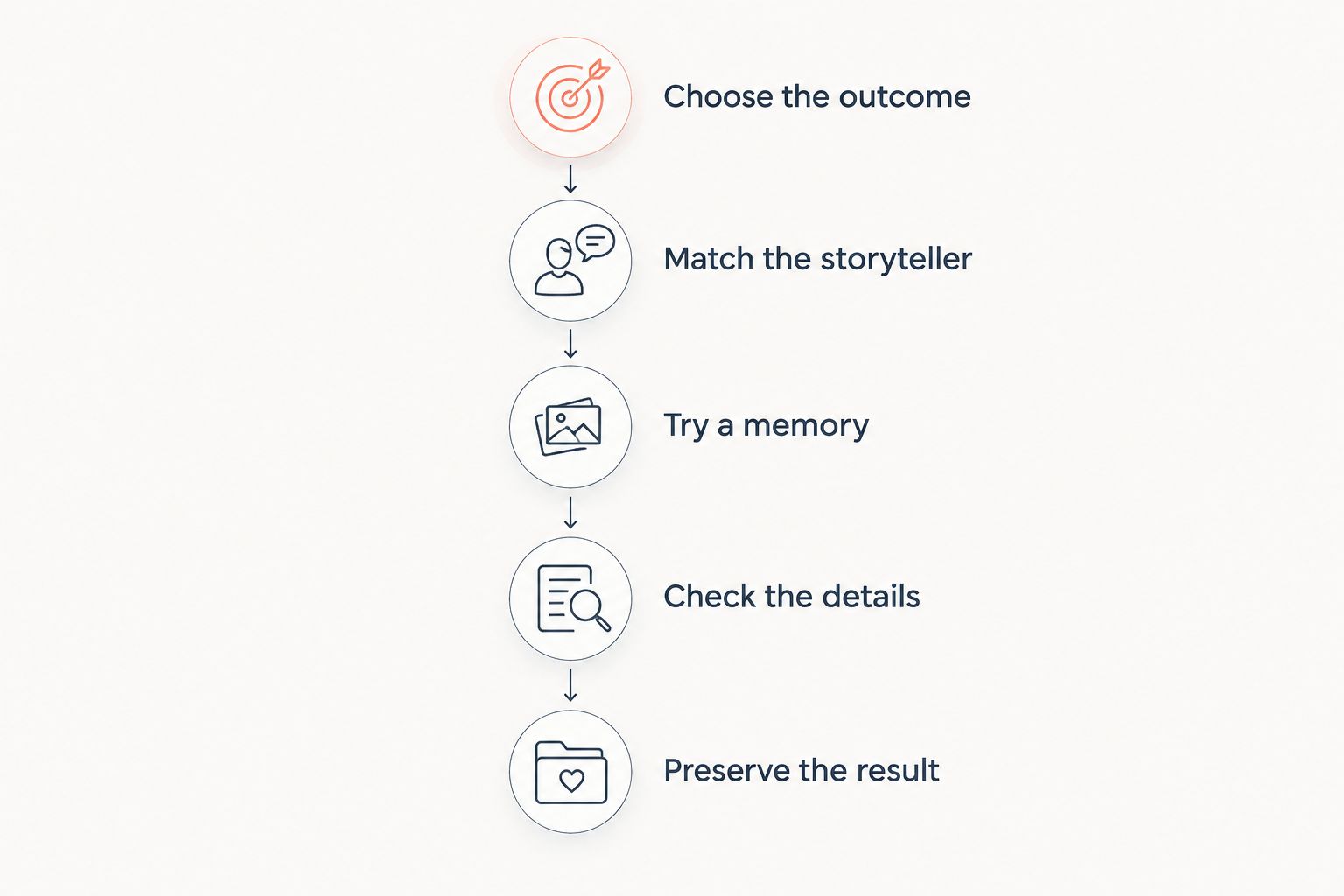
The best choice in 2026 is the one that matches both the storyteller's preferred activity and the family's intended result. Use this sequence before asking a relative to commit.
Choose the outcome
Name the deliverable first: a memoir, a researched tree, an image archive, or original recordings. If you want several, identify the primary outcome and use supporting apps only where they fill a separate need.
Match the storyteller
Ask whether your relative wants to talk, write, or explain photographs. Choose the capture method around that answer. Avoid making the storyteller learn a research workflow when the real task is sharing personal memories.
Try a memory
Use a familiar event to try the process. Does the storyteller know how to begin? Can the intended reader understand the resulting material without a separate explanation? Evaluate the experience, not just the feature list.
Check the details
Separate recollection from verified information. Preserve meaningful memories while checking names, relationships, and dates against available evidence. Do not silently turn an uncertain recollection into a confirmed fact.
Preserve the result
Plan how relatives will receive the finished material. For files you export, keep 2 copies in separate locations rather than relying on a single device. Review sharing permissions before circulating private stories.
What to ask during your first family-history interview
Start your 2026 project with a specific scene rather than an invitation to summarize an entire life. Ask these 3 questions as a conversation opener:
- Where were you? Ask the storyteller to describe the place and who was present.
- What happened? Follow the sequence of events instead of jumping immediately to its meaning.
- Why remember it? Ask what makes the experience important to them now.
Then follow the details that emerge. A mention of a neighbor, a workplace, or a family tradition gives you a more useful next question than a generic request for another story.
Avoid interrupting every uncertainty. Make a separate note to check a name or date later, and let the storyteller finish the memory. This keeps the interview focused on recollection without treating every remembered detail as documentary evidence.
How these apps were ranked
This 2026 ranking prioritizes the route from capturing memories to a usable family keepsake. Spoken memoir creation takes the default position because it connects an interview-led starting point with a printed result.
The remaining slots serve different needs rather than competing for the same label. Written storytelling, connected memories, genealogy research, photograph organization, and original audio each have a distinct winner. The comparison describes those workflows; it does not claim a hands-on product test or measured performance advantage.
Which family-history app should you choose?
Choose Myvellum if you want apps for capturing family history that guide spoken recollections toward a printed memoir. Choose Storyworth if the storyteller prefers writing, or Apple Voice Memos if keeping original interviews is your immediate goal.
Choose Ancestry for documentary research, FamilySearch Memories for artifacts connected with family profiles, and Google Photos for the visual collection. Do not ask a photograph organizer to do a memoir app's job.
For an undecided family in 2026, settle the output question first. If everyone pictures a book on the shelf, start with a book-oriented workflow rather than building an archive and hoping someone edits it later.
FAQ
What's the best app for capturing family history as a printed book?
Myvellum is the best fit here for spoken memories becoming a printed memoir. Its voice-driven process guides individuals through 12 structured interview chapters and produces a personalized hardcover or softcover keepsake book.
Is Storyworth better than a voice-recording app?
Storyworth is a better fit for someone who wants to write stories for a book; a voice-recording app is better for preserving original spoken interviews. Choose based on the storyteller's preferred capture method and the finished format you want.
What's the difference between a family-history app and a genealogy app?
A storytelling app captures personal experiences, while a genealogy app focuses on relationships and historical evidence. Some tools support both kinds of material, but a family tree does not replace a life story.
Can I use Google Photos to capture my family's history?
Yes, Google Photos can organize and share the visual part of your family's history. Add names, occasions, and explanations so relatives understand what the photographs show; use a separate workflow for a continuous memoir.
What's the best option for a relative who prefers talking to typing?
A voice-driven memoir app or an audio recorder fits a relative who prefers speaking. Choose a memoir workflow for a finished book, or a recorder when your main goal is preserving the original interview.
Should I verify stories before putting them in a family memoir?
Yes, check factual details where evidence is available and distinguish uncertainty from confirmed information. A relative's account still matters as personal recollection, even when every date cannot be established.
Do I need several apps to preserve family history?
No, start with the app that produces your main intended result. Add another only for a separate need, such as researching records, organizing photographs, or preserving original audio.
One last thing
Ask your storyteller which memory they wish someone had asked about sooner. That question gives them control over the subject instead of treating their life as a checklist.
For your 2026 family-history project, begin there. The app provides a place to capture the answer; the person decides what deserves to be remembered.