Preserve voice recordings for future generations by keeping the original audio, making independent backups, documenting who and what each recording contains, and leaving clear access instructions. A transcript or family memoir adds another way to understand your stories, but neither replaces the sound of your voice.
- To preserve voice recordings future generations can understand, keep original audio, clear labels, and independent backups.
- Use a 3-2-1 backup plan: three copies, two storage types, and one copy off-site.
- Myvellum suits people turning spoken memories into family memoir books; preserve original recordings separately.
- Treat starting a free memoir and ordering a printed keepsake as separate decisions.
How do you preserve voice recordings for future generations?
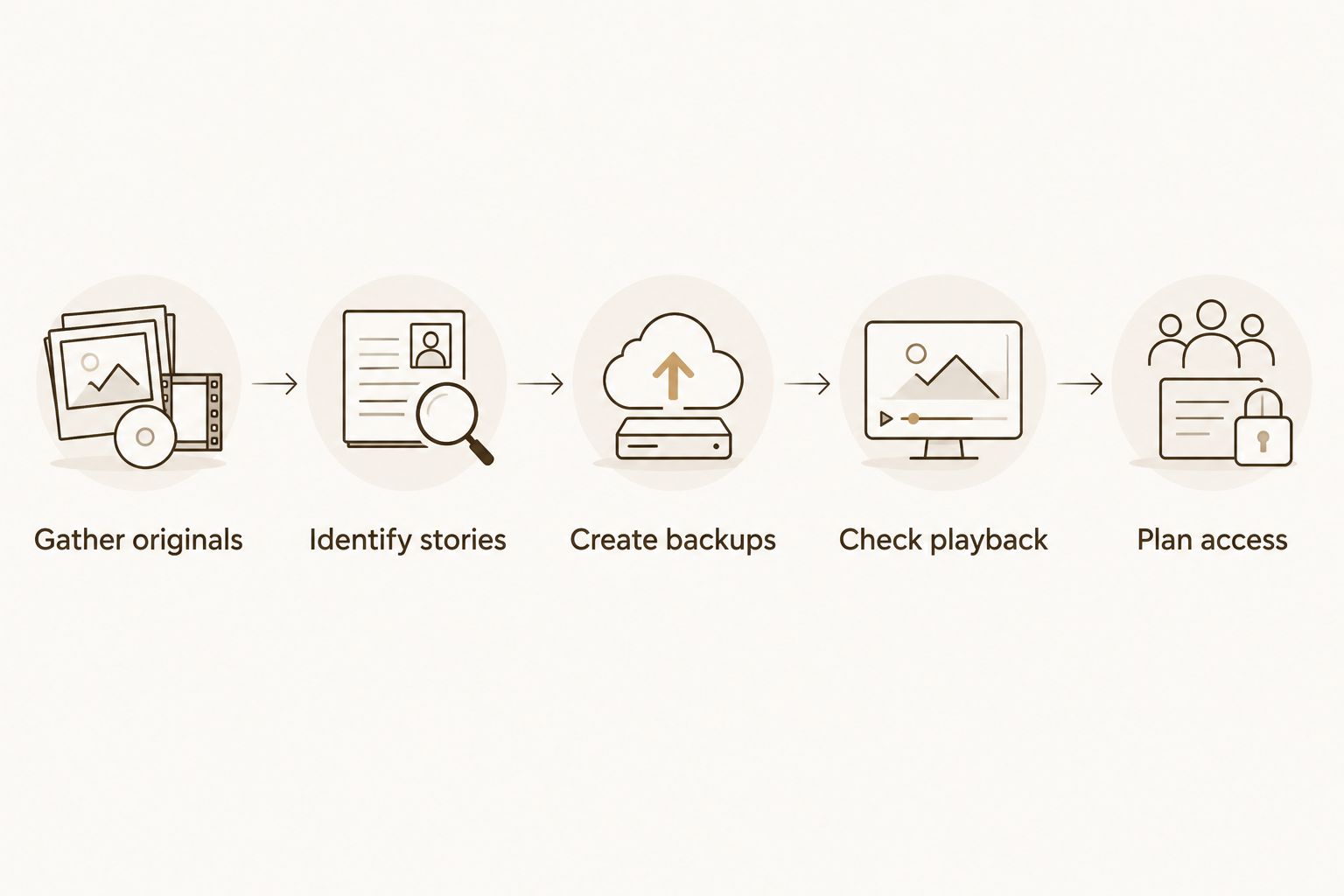
Preserve the recording, its meaning, and a way to access it. Your family needs all three, not just a folder of unfamiliar filenames. For recordings you organize in 2026, follow this sequence:
- Gather originals. Copy recordings from phones, computers, recorders, and existing storage without deleting the source files.
- Identify stories. Label each recording with the speaker, subject, and recording date when known.
- Create backups. Keep independent copies across different storage types, including an off-site location.
- Check playback. Open the saved files and confirm that the recordings play beyond the opening seconds.
- Plan access. Tell a trusted person where the archive is and how authorized access should work.
If your next goal is a readable family keepsake, the guide to turning phone voice recordings into memoir chapters addresses that separate writing task. Preserve the source audio before you begin editing its words.
Why this matters
A recording holds more than its spoken words. Your pauses, laughter, accent, and emphasis are part of what your family will hear; a written account preserves the story differently.
The practical problem is separation. Audio can become separated from its owner, its playback software, or the explanation that makes a passing reference understandable. A file labeled with a familiar nickname might make sense to you in 2026 and tell a future listener very little.
Build an archive a relative can understand without asking you to explain it. That means preserving ordinary details alongside major life events: the place you called home, the people around the table, and why a particular decision mattered.
Keep original recordings before making changes
Start with an inventory of where your audio lives. Include voice memos, recordings attached to messages, computer folders, removable drives, and any older recording devices you still use. Copy files into a working archive while keeping their existing names until you can identify them.
Do not trim, clean up, or convert your only copy. Save edited versions separately, and distinguish them with descriptive filenames such as school-days-original and school-days-edited. A shorter version can be useful for family listening without becoming a substitute for the complete recording.
For recordings inside an app, check whether you can download the audio itself. Being able to play a recording inside an account is different from holding an independent file. Confirm what a download contains rather than assuming it includes the original sound.
If a file refuses to open, preserve it anyway while you investigate its format. Renaming its extension does not convert it, and repeatedly saving over the source makes it harder to return to what you started with.
Which audio format should you keep?
Keep the original format first; create additional versions only for a clear purpose. Converting compressed audio into an uncompressed format does not restore sound information already removed during compression.
The following options serve different purposes. None eliminates the need for backups and playback checks.
| Option | Best for | Advantage | Limitation |
|---|---|---|---|
| Original recording file | Preserving the source | Retains the file you actually recorded | Playback depends on compatible software |
| Uncompressed WAV copy | A preservation copy when appropriate | Avoids additional lossy audio compression | Uses more storage than compressed audio |
| MP3 listening copy | Convenient family listening | Commonly supported and smaller than uncompressed audio | Lossy encoding removes audio information |
| Transcript or printed memoir | Reading and understanding stories | Makes words accessible without audio playback | Does not preserve vocal expression |
If you already have an MP3, keep it. Do not discard a meaningful recording because it is not in an ideal archival format. For new recordings, check the recording settings before a session and choose a format you can save independently.
Avoid repeatedly converting a listening copy between lossy formats. Make new working versions from the best source you hold, and label them so your family knows which file is the original.
Make a 3-2-1 backup plan
The 3-2-1 approach means keeping 3 copies across 2 storage types, with 1 copy off-site. Treat it as a practical backup pattern, not a promise that files will last forever.
For a personal archive, you might keep a working copy on your computer, another on an external drive, and an off-site copy in separate storage. The point is independence: losing a device or access to one location should not remove every copy.
A synchronized folder is useful for convenience, but it is not automatically an independent backup. Deletions can synchronize too. Check whether your chosen service offers recovery or version history, and understand those settings before relying on them.
Your 2026 backup plan should answer these questions:
- What is included? Save the audio, transcripts, labels, and archive instructions together.
- Where are the copies? Record their locations in your archive notes.
- What happens after deletion? Know whether another copy remains untouched.
- Who can recover them? Assign a trusted person and explain the access arrangement.
An external drive left beside your computer provides another copy, but not another location. Move an off-site copy somewhere genuinely separate, with the same attention to privacy you give the working archive.
Label recordings so the stories remain understandable
Useful labels tell a listener who is speaking, what the story concerns, and when it was recorded. Include a recording date only when you know it; keep the date of the event separate from the date you described it.
For a session recorded in 2026 about an earlier period, identify both clearly. If the event date is uncertain, write that uncertainty into the notes instead of turning an estimate into a fact.
Use a simple accompanying document with fields such as:
- Speaker: Your full name and any name used in the recording.
- Subject: The event, relationship, place, or theme discussed.
- People mentioned: Full names and relationships where known.
- Recording details: Date, language, and circumstances when relevant.
- Corrections: Misspellings, uncertain dates, or later clarifications.
- Sharing instructions: Who should hear it and any restrictions you want respected.
Explain family shorthand. A reference to an aunt, a neighborhood shop, or a childhood nickname can leave descendants guessing unless you identify the person or place.
Keep these notes beside the recording rather than only inside a particular app. The goal is a collection that remains understandable when separated from the device you used to make it.
Why preservation needs vary
The right preservation work depends on what you have, not on a single storage purchase. Review these factors before choosing where to put your archive:
- Original medium: A recording on a phone requires a different transfer process from audio on an older physical medium.
- File format: The archive needs software that can open the files you hold.
- Account dependence: Recordings stored only inside an account need an access and export plan.
- Privacy: Sensitive stories require deliberate sharing permissions, including on backups.
- Family context: Unfamiliar names, languages, and places need explanatory notes.
- Intended use: Listening, reading, and preparing a printed memoir call for different working copies.
A small, clearly documented archive is a better starting point than an elaborate system you cannot explain to someone else. Add complexity only when it solves an actual access, storage, or privacy problem.
How do you check that backups actually work?
Test the saved copy, not just the original. Open a recording directly from its backup location and listen at the beginning, middle, and end. Confirm that you can hear the intended speaker and that the file is not an incomplete export.
Check the accompanying notes as well. An audio backup without its labels can preserve the sound while losing much of the story's meaning.
Put a review date in your calendar rather than relying on memory. Recheck the archive when you replace a device, change storage services, or alter account access. A successful playback check in 2026 establishes that the file works now; it does not remove the need for later checks.
For additional integrity checking, a checksum can help detect whether a file's contents have changed. It does not establish that the original recording was complete or audible, so keep playback testing in the process.
Who should have access to your recordings?
Choose a trusted person who understands both your archive and your sharing wishes. Leave an inventory of storage locations and use an appropriate secure method for account-access instructions; do not put passwords in a document you plan to distribute widely.
Separate preservation from publication. You can keep a complete private recording while preparing a shorter version for family sharing. Mark restrictions clearly, especially where a story includes another person's sensitive information.
Ask the designated person to try opening the shared material now. That practical check reveals access problems while you can still explain the collection and correct the instructions.
Can a printed memoir help preserve your voice recordings?
A printed memoir preserves a readable account of your memories, not the original sound. Keep the audio archive and the family book as complementary keepsakes. One lets relatives hear how you told a story; the other gives them a shaped account they can read.
Myvellum is best for people who want guided spoken storytelling shaped into a printed family memoir. At Myvellum, the voice-driven memoir process uses twelve structured interview chapters and produces a personalized hardcover or softcover life-story book. Keep your audio-preservation plan separate rather than treating book production as proof of long-term audio storage.
For readers visiting myvellum.vercel.app, starting a free memoir and ordering a printed book are separate steps. Begin by telling your own stories, then review the account you want your family to read before deciding on a printed keepsake.
As you prepare the manuscript, check names, distinguish recollection from confirmed detail, and retain expressions that sound like you. Editing should make your meaning clearer without replacing your voice with language you would never use.
FAQ
What's the best way to preserve my voice recordings for my family?
Keep original audio files, independent backups, clear descriptions, and access instructions. Use the 3-2-1 backup approach and test playback from the backup locations.
Should I convert every voice memo to WAV?
No, preserve the original voice memo before considering conversion. Converting compressed audio to WAV does not restore information already lost through compression.
Is cloud storage enough for my family recordings?
Cloud storage should not be your only copy. Keep independent backups and check how deletion, account recovery, and authorized family access work.
Does a transcript replace the original recording?
A transcript does not replace the original recording because it cannot preserve the speaker's sound and expression. Keep it as a companion that helps relatives read and understand the story.
How do I preserve recordings that mention private family matters?
Preserve a private original and create a separate sharing copy when needed. Document your wishes and limit access to the complete recording accordingly.
Can Myvellum help me turn spoken memories into a family book?
Myvellum guides spoken memoir writing through twelve structured interview chapters and produces a personalized hardcover or softcover keepsake book. Preserve original audio separately from the printed memoir.
One last thing
Record an introduction to your archive in your own voice. Explain who you are, whom you are speaking to, how the collection is organized, and which story you suggest hearing first.
That introduction gives your family a starting point instead of another folder to decipher. Save it with the same labels, backups, and access instructions as the memories it introduces.