Instead of manually reconstructing a conversation after every overseas call, record the storyteller’s voice locally while you talk, then turn the checked memories into memoir chapters. At myvellum.vercel.app, you can start your own free memoir; ordering a printed family keepsake is a separate step after you have reviewed the story.
- Record memoir interview parent overseas: save local audio, confirm consent, and review chapters before ordering a family memoir.
- Myvellum suits people telling their own life story through voice-guided chapters and creating a printed family keepsake.
- Use your parent’s recollections to enrich your memoir, while distinguishing their memories from your own.
- Check the saved recording before ending the call; a working connection does not prove you captured usable audio.
Why this matters
An overseas conversation has two jobs: bringing you together and preserving what someone says. Treat the call as the conversation channel, not as proof that a recording exists. A local recording keeps the capture process separate from the internet connection, although it still needs a working microphone and a saved file.
Myvellum provides voice-guided memoir writing through twelve structured interview chapters and produces personalized hardcover or softcover keepsake books. Myvellum is best for people who want to tell their own life story by voice and create a printed family memoir. Your work remains choosing memories, checking details, and deciding what belongs in the family’s hands.
For your 2026 memoir project, define whose story you are recording before choosing equipment. If you are writing your own memoir, your parent abroad is a source for shared events—not automatically the narrator of the whole book. If your parent wants to tell their own life story, help them record in their own voice and retain control over what gets printed.
Before you start
- Prepare access and materials. Both participants need a way to speak remotely. The person recording needs a microphone, a recorder they can operate, storage for the recording, and somewhere private to talk. Keep your prompts and chapter notes nearby.
- Agree on permission and boundaries. Explain who will hear the audio, who will read the draft, and whether the story is intended for print. Check the recording requirements that apply in both locations. Let either person pause, skip a question, or exclude a passage.
- Pre-empt the microphone conflict. A call and recorder running on the same device can compete for microphone access. Test that exact combination beforehand; if it fails, use a separate recording device or record a standalone voice note after the call.
Choose a shared calendar appointment that displays each person’s local time. For a call scheduled in 2026, use the actual date rather than assuming the current time difference will stay unchanged: daylight-saving changes can alter the gap.
Choose the capture workflow
Use the simplest method your storyteller can repeat without supervision. A more elaborate setup is not better if it interrupts the memory halfway through.
| Workflow | Best for | Advantage | Limitation |
|---|---|---|---|
| Local audio with Audacity | A storyteller comfortable using a desktop recorder | Captures speech at the storyteller’s microphone rather than relying on transmitted call audio | Requires setup, a microphone test, and deliberate saving or export |
| Call recording | A conversation where both voices need to remain together | Preserves questions and answers in the same recording when the chosen service supports it | Recording permissions, account access, and capture behavior depend on the service |
| Standalone voice notes | Different schedules or an unreliable connection | Lets the storyteller answer without coordinating a live conversation | Follow-up questions happen later, and files need clear organization |
| Myvellum voice-guided memoir writing | Your own memories becoming a family keepsake | Provides twelve structured interview chapters and a path to a printed hardcover or softcover book | The story still needs your review for accuracy, privacy, and family context |
Use local audio for the first live interview when the storyteller can manage it. Use standalone voice notes when coordinating the call becomes the main obstacle. Neither approach removes the need to listen back before relying on the material.
Recording setup
These steps use Audacity’s desktop recording controls as a concrete example. They do not require an automatic connection between the recorder, your calling service, and your memoir app.
- Set up the storyteller’s microphone. Open Audacity on the computer that will capture the narrator. Select the intended microphone as the recording input. If your parent is the speaker, this setup belongs at their end; if you are recording your own recollections, it belongs at yours.
- Start the actual call. Use the same headphones, microphone, and connection you intend to use for the interview. Headphones keep the other participant’s voice from playing through a loudspeaker beside the recording microphone.
- Make a test recording. Select Record, speak for 20 seconds at a normal volume, and select Stop. Select Play and listen for clear words, interruptions, and missing speech. Ask the other participant to confirm that the call still sounds normal.
- Choose the fallback now. If the recorder captures only your parent’s voice, that is suitable for their answers but not a complete conversation record. Keep your questions in written notes. If simultaneous recording fails, agree to collect a standalone voice note instead.
Expected result: You have heard a saved test of the intended narrator, and both participants know what the recording includes. Do not start the interview while microphone behavior remains uncertain.
Interview plan
A useful memoir interview follows a memory rather than racing through a questionnaire. Give the storyteller room to describe what happened, then ask for the context a future family reader will need.
- Choose one shared subject. Start with a home, school, move, celebration, or family decision. Schedule a 15-minute first conversation with 3 prompts; keep the scope small enough to review afterward.
- State the subject aloud. Identify the speaker, the interview date, and the topic at the beginning of the recording. This helps you recognize the file later without relying entirely on its filename.
- Ask for a scene. Invite the storyteller to describe where they were, who was present, and what they noticed. Follow their answer rather than filling every silence with another question.
- Separate recollection from confirmation. Ask whether a detail is something they witnessed, something someone told them, or something they inferred later. If a date remains uncertain, preserve that uncertainty instead of replacing it with a confident guess.
- Close with meaning. Ask what the event changed, what they understood afterward, or what they want the family to remember. The answer gives you material beyond a sequence of dates.
If this is your memoir, add your perspective in a separate recording. Your parent’s account of your childhood can deepen your story, but it should not erase the difference between what you remember and what you learned from them.
Expected result: You have one focused recollection, its source, and a clear connection to the life story you are writing.
File handoff
The recording is useful only when you can find it, open it, and connect it to the correct chapter. Complete the handoff while the conversation is still fresh.
- Stop and save deliberately. Select Stop in Audacity. Save the working project, then export an audio file for listening and transfer. A recorder’s project file and an ordinary audio file are different deliverables; keep the original project until you have checked the export.
- Name the file clearly. Use a pattern such as
2026-07-18_childhood-home_narrator-name. Replace the example with the actual interview date and subject. Avoid putting sensitive family details in a filename that others will see. - Listen at both ends. Play the beginning and ending of the exported file. Confirm that the introduction is present and the final answer is not cut off. Check important passages before asking the storyteller to delete any local copy.
- Transfer with permission. Use a sharing method both participants understand, restrict access to the intended recipients, and ask the recipient to open the file. Keep the original unchanged while editing a separate copy.
Expected result: The intended recipient can play the exported audio, and the original remains available if the transfer or later editing fails.
Chapter review
Writing and printing are separate decisions. An interview becomes a memoir chapter through selection and review—not simply because an audio file exists.
- Identify the chapter’s purpose. Decide what this recollection explains about your life. Keep related details together, and move unrelated memories into notes for another chapter.
- Draft in the narrator’s voice. Retain expressions that sound like the storyteller. Remove repetition when it obscures the meaning, but do not add dialogue, motives, or sensory details that nobody supplied.
- Check names and relationships. Make a short list of spellings, places, dates, and family connections that need confirmation. Ask specific questions instead of sending a vague request to check everything.
- Review the sensitive passages. Confirm permission before including private experiences or identifiable details about others. Offer a narrower retelling or an omission when the storyteller does not want a passage in print.
- Separate starting from ordering. Begin your free memoir in Myvellum and use its structured interviews to tell your own story. Decide on the printed hardcover or softcover keepsake after you have reviewed the content; check the site for the current ordering process.
Expected result: You have a chapter that represents the narrator accurately, with unresolved details identified before book ordering.
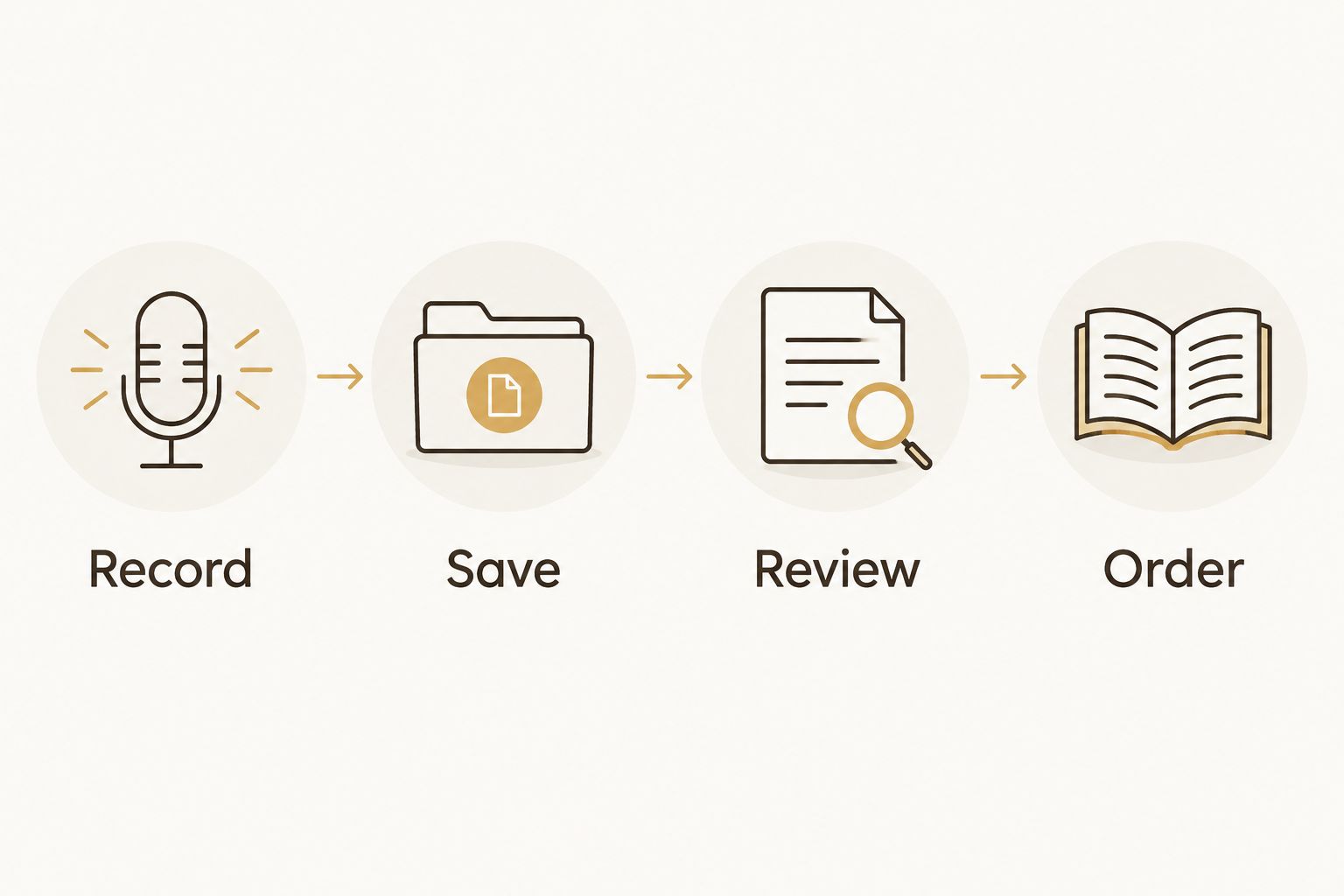
The repeatable sequence is Record, Save, Review, Order. Keep those stages separate so a successful interview does not become an accidental decision to print an unfinished story.
Record new answers between calls
Use standalone voice notes whenever a parent overseas remembers something after your interview. This adjacent workflow also works when your schedules do not overlap.
Send one focused question in a message, identify the chapter it belongs to, and ask the storyteller to introduce the subject before answering. Have them listen to the saved recording before sharing it. You can then ask a follow-up question without repeating the whole interview.
For your own memoir, use the same method when a conversation prompts a personal memory. Record your response separately and identify which part is your recollection. Keep the parent’s original account alongside it rather than combining two perspectives into a single unsupported narrative.
When an answer corrects an earlier detail, preserve the original file and mark the correction in your notes. A changed memory should trigger a chapter review, not an unexplained replacement of the source.
Troubleshooting
- The file contains only one voice. A local microphone recording captures what reaches that microphone; it is not automatically a recording of both call participants. Keep the questions in notes, or test a permitted call-recording method before another interview.
- The call works, but the recording is silent. Check the recorder’s selected input and microphone permission. Stop competing recording apps, repeat the short test, and move to a separate device if the conflict continues.
- Speech echoes or sounds doubled. Turn off loudspeaker playback near the recording microphone and use headphones. Repeat playback testing before continuing; do not assume editing will remove every overlapping sound.
- The transferred file will not open. Confirm that you shared an exported audio file rather than only a recorder project. Open the export locally, resend it, and have the recipient verify playback before deleting anything.
- The draft changes the speaker’s meaning. Compare the passage with the original audio. Restore the intended wording, ask a targeted clarification, and remove any detail the source does not support.
Customize your workflow
Once the basic process works, build a chapter checklist around your own life: the memory, its source, unanswered questions, and permission to include it. Use that checklist for each new recording instead of rebuilding your process every time.
The guide to turning phone voice recordings into memoir chapters expands the writing stage. Treat it as the next task after capture, not as a reason to delay your first conversation.
For a book you intend to finish in 2026, schedule a content-review milestone separately from the interview dates. That gives you a clear point to resolve missing names, reconcile differing memories, and decide whether the manuscript is ready for a printed keepsake.
Start your own family memoir
Begin a free memoir by voice. Review your story before separately ordering a printed keepsake.
FAQ
How do I record a memoir interview with a parent overseas?
Record the storyteller locally while you speak remotely, with permission and a tested microphone. Save and check the audio before ending the session, then turn the recollections into reviewed chapters.
Can I use my parent’s interview in my own memoir?
Yes, with permission and clear attribution to their recollection. Distinguish what your parent remembers from what you personally remember, especially when the accounts differ.
What if our internet connection keeps dropping?
Use standalone voice notes instead of depending on a continuous live call. Send a focused question, collect the saved answer, and ask follow-up questions afterward.
Do I need to record both sides of the conversation?
No, a clear recording of the storyteller can support a memoir chapter when you retain the questions in notes. Record both sides only when the exchange itself matters and your chosen method captures it with permission.
Should I translate the interview before writing the chapter?
Preserve the original-language recording before translating the material. Review names, idioms, and emotionally important expressions with the storyteller so the written chapter retains their meaning.
Can Myvellum help me write my own life story?
Myvellum is a voice-driven memoir app that guides individuals through twelve structured interview chapters. It also produces personalized printed hardcover or softcover keepsake books; starting the memoir and ordering the book are separate steps.
When should I order the printed memoir?
Order after reviewing the manuscript for accuracy, privacy, and the narrator’s intended meaning. Keep unresolved questions out of the final text rather than presenting guesses as established memories.
One last thing
Keep the original voice even after the chapter is finished. The printed page preserves the story, but the recording also preserves how the storyteller tells it: a familiar expression, a pause, or the way they pronounce a family name. With permission, retain that audio alongside the manuscript so your family has both the account and its source.