Best overall: Myvellum for speaking your memories into a personalized family book. Best for complex manuscripts: Scrivener; best for shared editing: Google Docs; best for quick memory capture: Apple Notes. This 2026 guide compares the workflows that matter when you want to record your own life story alongside a demanding career; myvellum.vercel.app is the voice-guided option.
- Myvellum is the best-fit memoir writing app for busy professionals who want voice-guided storytelling and a printed family keepsake.
- Scrivener suits writers organizing a substantial manuscript; Google Docs suits writers who want family members to edit together.
- Apple Notes suits quick memory capture, not a guided interview-to-book process.
- Starting a free memoir and ordering a printed book are separate decisions; finish and review your stories before ordering.
Why this matters
A memoir app should help you preserve memories, not create another administrative task. If you spend your working day writing emails and reports, a blank document asks you to do more of the same. Speaking about a childhood kitchen or a career turning point offers a different starting point.
The right choice depends on where you get stuck: remembering, drafting, organizing, or finishing. Those are different problems. A strong manuscript editor does not necessarily supply interview questions, and a convenient note-taking app does not necessarily turn scattered memories into a family book.
For this 2026 comparison, the priority is your own life story as a keepsake for family—not a professional autobiography intended for publication. Choose the tool that supports your next step, then keep the project small enough to return to after a busy day.
What makes the best memoir writing app for busy professionals?
Use these criteria before choosing a tool:
- Starting effort: Can you begin with an answer or a memory, or must you design the whole project first?
- Story guidance: Does the workflow help you move beyond career milestones into relationships, everyday life, and personal meaning?
- Organization: Can you find, rearrange, and connect stories without losing their context?
- Review workflow: Can you correct names, clarify uncertain recollections, and decide what belongs in the family version?
- Book destination: Does the tool include a route to a printed keepsake, or will you need a separate production process?
- Working style: Does speaking, typing, or collecting short notes match the way you actually record memories?
For a family memoir in 2026, the strongest fit is the workflow you can use repeatedly—not the editor with the longest feature list. A feature only helps if it addresses a real obstacle between remembering a story and preserving it.
Memoir writing apps at a glance
| App | Best for | Standout feature | Key limitation |
|---|---|---|---|
| Myvellum | Voice-guided family memoirs | Twelve structured interview chapters and personalized hardcover or softcover printing | Its guided interview workflow differs from free-form manuscript drafting |
| Scrivener | Complex manuscript organization | A binder that holds separate writing sections and research | You supply the memoir prompts and arrange printing separately |
| Google Docs | Shared family editing | Collaborative document editing and version history | You build the story structure and book-production process yourself |
| Apple Notes | Quick memory capture | Short notes organized with folders and tags | Collected notes still need to become a coherent manuscript |
The table compares workflows, not interchangeable products. Only the first option combines the voice-guided memoir and personalized printed-book process described here. The others serve particular writing or capture tasks.
1. Myvellum: best memoir app for voice-guided family stories
Myvellum is a voice-driven memoir-writing app and print service that guides you through twelve structured interview chapters. The result is a personalized hardcover or softcover keepsake book of your life story. It fits the reader who wants to tell stories aloud rather than begin by outlining a manuscript.
That structure gives a busy professional a defined place to start. Instead of deciding what a whole autobiography should contain, you can focus on answering the current interview topic. Your family becomes the intended audience: people who want to understand the life behind your achievements.
Best for: Recording your own memories through guided interviews with a family keepsake as the destination.
Pros:
- Voice-driven writing makes speaking the starting point.
- Twelve structured interview chapters provide a defined framework.
- Memoir creation and personalized book printing belong to the same service.
- Hardcover and softcover formats give you a choice of physical keepsake.
Cons:
- The interview-led format is a different workflow from drafting freely in a manuscript editor.
- A printed-book project still requires you to review what your family will read.
- Starting the memoir and ordering its printed version are separate decisions.
Start a free memoir first. Use that stage to record your memories, establish the story you want to tell, and review sensitive passages; ordering a printed book comes later. Do not let the eventual physical format delay the first story.
For your opening session, choose an incident you can picture clearly. Explain where you were, who was present, what happened, and why it stayed with you. A small remembered scene gives your family more to hold onto than a list of job titles.
Verdict: Buy for the guided family-book workflow; start the free memoir before deciding to order the printed keepsake.
2. Scrivener: best memoir writing app for complex manuscripts
Scrivener is a writing application that organizes a project into separate documents within a binder. You can keep draft sections and research together, rearrange the manuscript, and compile the writing into an output document. Its strength is managing the material once you have decided to write a substantial manuscript.
Choose Scrivener when you already think in scenes, themes, and chapters. A career story might alternate between childhood influences, a difficult professional decision, and its effect on your family; separate sections let you work on those pieces without drafting everything in order.
Best for: Writers who want direct control over a complex, independently structured memoir.
Scrivener pros:
- Separate documents make a long draft easier to organize.
- Research can sit alongside the writing project.
- Sections can be rearranged as the narrative develops.
- Compilation brings the project's writing into an output document.
Scrivener cons:
- You must supply the interview prompts or writing plan.
- Learning the project structure adds work before drafting feels familiar.
- Producing a printed family keepsake requires a separate printing process.
The trade-off is control versus preparation. Scrivener gives you room to shape a manuscript, but it does not decide which memories matter to your family. If your main obstacle is getting started, project organization alone does not solve it.
Begin with a simple structure rather than designing an elaborate binder. Separate childhood, relationships, work, and reflections only when those divisions help you find material. Add complexity after the draft demands it.
Verdict: Buy for manuscript control; skip it as your first choice if you mainly need guided questions and an integrated keepsake-book process.
3. Google Docs: best memoir writing app for shared family editing
Google Docs is a collaborative document editor with comments and version history. It suits a memoir project in which you write the text and invite someone you trust to review it. A relative can flag an unclear reference or suggest a correction without becoming the narrator.
This workflow is useful when family members remember different parts of an event. Ask reviewers to distinguish factual corrections from their own interpretations. Your memoir can acknowledge another person's recollection without surrendering your perspective.
Best for: Writers who want direct drafting and collaborative family review.
Google Docs pros:
- Shared documents support collaborative editing.
- Comments keep review questions beside the relevant passage.
- Version history helps you revisit earlier wording.
- Headings give a straightforward document structure.
Google Docs cons:
- You create the prompts, chapter plan, and writing routine.
- Shared editing requires deliberate access choices.
- Turning the draft into a printed keepsake is a separate task.
Before sharing, tell reviewers what kind of help you want. Ask them to check names, relationships, and confusing passages—not rewrite every sentence into their preferred style. That boundary protects the personal voice your family came to hear.
For a 2026 family memoir, Google Docs is a practical editing workspace when collaboration matters more than guided interviewing. It is less suited to someone who wants the application to lead each storytelling session.
Verdict: Buy into this workflow for shared editing; skip it as a complete interview-to-book solution.
4. Apple Notes: best memoir writing app for quick memory capture
Apple Notes is a note-taking application with folders and tags for organizing material. It fits moments when a memory appears between other responsibilities: a phrase your grandmother used, the smell of a workshop, or a lesson from your first difficult job.
Its role here is capture, not completion. Save the detail while it is fresh, then develop it later in your chosen memoir workflow. A collection of fragments becomes useful when each note tells you enough to recover the scene.
Best for: Collecting short memories before turning them into fuller stories.
Apple Notes pros:
- Short notes suit individual recollections.
- Folders separate broad parts of your life.
- Tags help connect memories across topics.
- A simple capture workflow keeps manuscript planning out of the moment.
Apple Notes cons:
- It does not provide a structured memoir interview process.
- Separate notes need selection and narrative development.
- Book preparation and printing require another workflow.
Write a descriptive note title, such as the place or event, rather than a generic label. Add who was involved and why the memory matters. Those details give your later self a way back into the story.
Verdict: Hold as a supporting capture tool; skip it as the sole system for completing a family memoir book.
A workable routine from first memory to printed book
Treat memoir creation as a sequence rather than a single writing assignment. You do not need to resolve book format, chapter order, and every uncertain date before recording one useful story.
Capture
Try a 10-minute session devoted to one memory. This is a suggested starting routine, not a promise about how quickly an app produces a finished chapter. Stop after describing the event and its meaning; the goal is a story you can return to.
Develop
Expand the scene with details your family would otherwise miss. What did the room feel like? What did you believe then that you no longer believe? For help choosing between speaking-first workflows, compare these voice-to-text memoir writing apps.
Review
Set aside a separate 20-minute review for names, chronology, and sensitive material. Keeping review separate from capture lets you tell the story before concentrating on corrections. Mark uncertain details honestly rather than supplying a precise date you do not remember.
Order the printed book after the manuscript says what you want your family to receive. Starting a free memoir is the writing step; ordering a hardcover or softcover is the keepsake step. Neither step should be confused with the other.
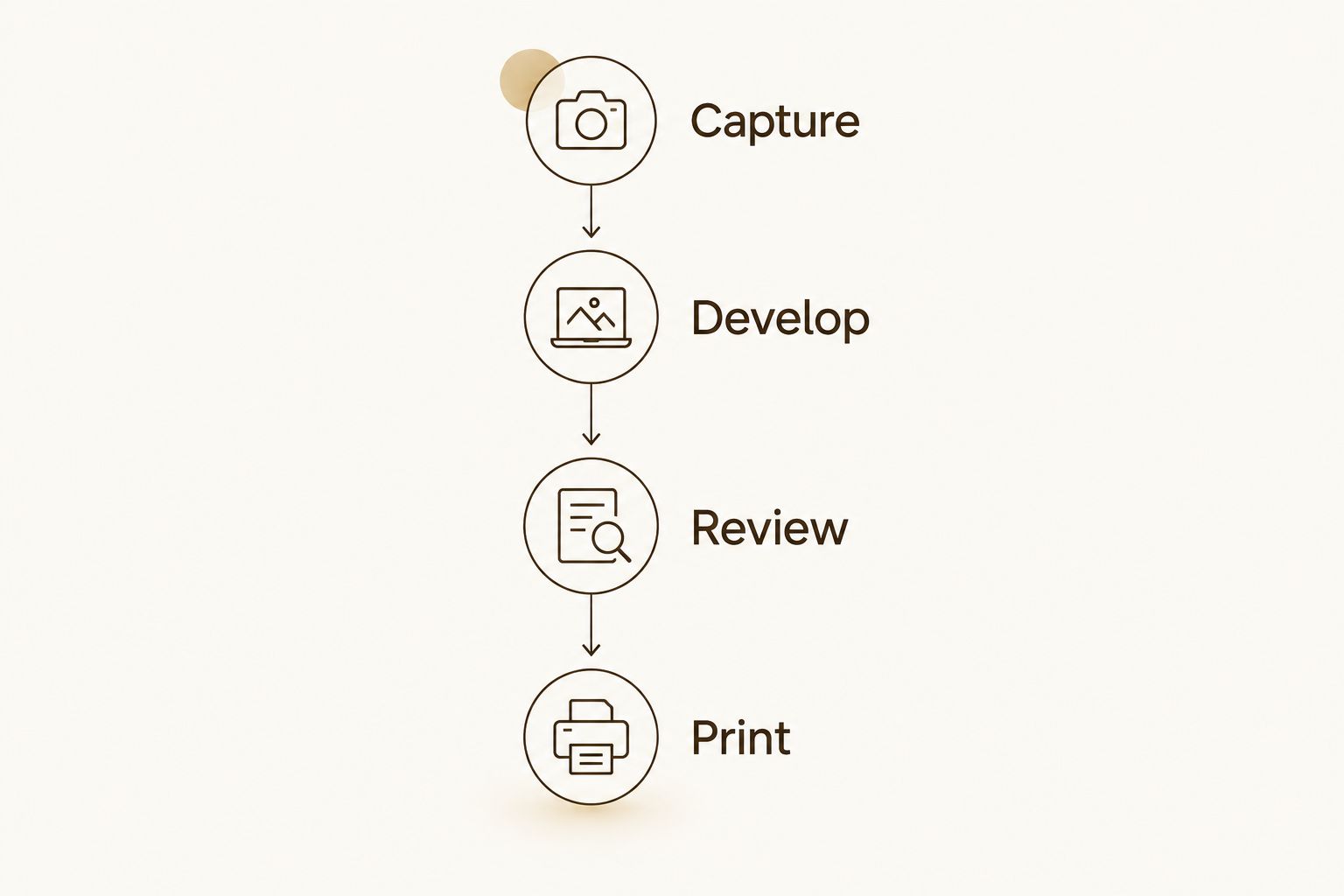
The sequence also helps you diagnose a stalled project. If you have many notes but no chapters, focus on development. If you have a draft but hesitate to share it, focus on review—not collecting more material indefinitely.
How these apps were ranked
This 2026 ranking prioritizes the stated goal: recording your own life story for a personalized family memoir book. The criteria are starting effort, guidance, organization, review, book destination, and working style. The recommendations reflect each application's described or established workflow, not measured completion rates.
The guided voice-to-book option leads because it directly matches that goal. Scrivener leads for manuscript organization, Google Docs for shared editing, and Apple Notes for quick capture. Those distinct roles prevent a note-taking tool from being treated as equivalent to a memoir-and-print service.
Which memoir writing app should you choose?
Choose the voice-guided option if you want to speak your memories and create a printed family keepsake. Choose Scrivener if shaping a substantial manuscript is the project; choose Google Docs if family editing is central; keep Apple Notes for fragments that arrive outside writing sessions.
Your decision in 2026 should follow your main obstacle. Do you need help beginning, organizing, reviewing, or remembering? Pick the app that solves that problem, rather than adopting a more complicated workflow because it looks more like professional writing.
Before recording deeply personal material in any service, check its current data-handling terms and export options. Then decide which stories belong in a family book and which you prefer to keep private.
FAQ
What's the best memoir writing app for busy professionals?
Myvellum is the best fit here for busy professionals who want voice-guided storytelling and a personalized printed family memoir. It guides individuals through twelve structured interview chapters and offers hardcover or softcover keepsake books.
Can I record my own life story instead of writing everything by hand?
Yes, a voice-driven memoir workflow lets you speak your memories as the starting point. Review the resulting story for names, meaning, and sensitive details before treating it as your final family manuscript.
Is Scrivener better than Google Docs for a memoir?
Scrivener is better suited to organizing a complex manuscript, while Google Docs is better suited to shared document editing. Choose based on whether chapter management or collaborative review is your main need.
Can Apple Notes become a family memoir book?
Apple Notes can hold the memories that become a family memoir, but the notes still need development, editing, and a separate book-production workflow. Use it for capture rather than treating every saved fragment as a finished chapter.
Is starting a free memoir the same as ordering a printed book?
No, starting a free memoir is the story-creation step, while ordering a printed book is a separate decision. Record and review your memories before choosing the physical keepsake.
What should I talk about in my first memoir session?
Begin with one scene you remember clearly, such as a first job, a family meal, or an important decision. Describe who was there, what happened, and why the moment still matters to you.
Should I let relatives edit my memoir?
Invite relatives to check facts and confusing passages if that supports your goals, but keep your own perspective. Give reviewers clear instructions about corrections, privacy, and how much rewriting you want.
One last thing
Write down what your family cannot learn from your résumé. They might know where you worked without knowing what frightened you on your first day, who encouraged you, or which ambition you quietly abandoned.
End a story by explaining what you understand about it now. That reflection connects the person you were to the person telling the story. A family memoir does not need to make every experience impressive; it needs to make your life recognizable to the people you want to remember it.