Best for a printed family memoir: Myvellum. Best for simple personal recordings: Apple Voice Memos. Best for editing recorded interviews: Audacity. This 2026 guide compares an oral history recording app with tools for transcription and shared interviews, so you can choose how to preserve your own story. myvellum.vercel.app is the starting point for the memoir-to-book option.
- Myvellum is the oral history recording app pick for turning your own memories into a printed family memoir.
- Apple Voice Memos suits personal audio capture; Audacity suits detailed recording edits.
- Otter suits searchable interview transcripts; StoryCorps suits guided conversations with another person.
- Choose your intended keepsake first: original audio, readable transcripts, or a personalized memoir book.
Why this matters
An audio recording preserves how you tell a story. A memoir gives your family a written account they can return to without listening through every recording. Those are different outcomes, and the best tool depends on which one you want.
For your 2026 project, decide what you want to hand down before choosing an app. If you picture a book on a family bookshelf, recording is the beginning—not the finished keepsake. If you want relatives to hear your voice, preserving the original audio belongs in your plan.
You do not need to tell your entire life in chronological order before you begin. Start with a memory you can describe clearly: a childhood kitchen, your first workplace, or the person who changed your direction.
What makes the best oral history recording app
Use these criteria to choose a tool in 2026. The ranking below separates recording, transcription, editing, and book creation rather than treating them as interchangeable features.
- Story guidance: Prompts help you move beyond dates and names to the experiences that shaped you.
- Recording fit: A solo recollection, an interview with a relative, and an edited audio project need different workflows.
- Review and correction: You need a way to catch misunderstood names, unclear passages, or unnecessary repetition.
- Family-ready output: A recording, transcript, and printed memoir serve different reading and listening habits.
- Control over sharing: Decide who should receive your story before publishing sensitive family material.
- Work left afterward: Consider whether you still need to organize chapters, edit audio, or arrange printing.
Choose the output you want, then work backward to the recording tool. A long feature list does not solve a mismatch between an app and your intended keepsake.
Oral history recording apps at a glance: 2026
| App | Best for | Standout feature | Key limitation |
|---|---|---|---|
| Myvellum | Your own printed family memoir | Voice-guided interviews across 12 chapters, with hardcover or softcover book production | The memoir workflow is a different purpose from audio editing or archival interviewing |
| Apple Voice Memos | Simple personal audio capture | Direct recording and basic editing on Apple devices | Chapter planning and book production remain separate tasks |
| Audacity | Editing recorded interviews | Multitrack audio recording and editing | It does not guide you through writing a family memoir |
| Otter | Searchable interview transcripts | Speech transcription with searchable text | A transcript still needs editing to become a memoir |
| StoryCorps | Guided conversations with another person | Interview questions and a conversation-centered recording approach | The interview format differs from producing your own printed autobiography |
These are use-case picks, not a claim that every app performs the same job. Keep the distinction between capturing a memory and preparing it for your family in view.
1. Myvellum: best for a printed family memoir
This voice-driven memoir-writing app guides you through 12 structured interview chapters and produces a personalized hardcover or softcover keepsake book. Its purpose fits readers who want to tell their own life story rather than assemble an audio-editing project.
The useful distinction is the destination. You are recording memories to shape a family memoir, not simply collecting sound files. That gives the project a clearer finish line.
Myvellum pros:
- Structured interviews give your recollections a chapter-based framework.
- Speaking provides an alternative to starting with a blank document.
- The service connects memoir writing with personalized book production.
- Hardcover and softcover formats support a physical family keepsake.
Myvellum cons:
- It is a memoir-writing choice, not a substitute for dedicated multitrack audio editing.
- A chapter framework still requires you to decide which memories belong in your story.
- Recording your account does not establish the accuracy of every remembered detail.
Best for: You want to tell your own story and turn it into a book your family can read.
Treat starting your memoir and ordering the printed book as separate steps. Begin by finding the memories you want to preserve; decide on printing after reviewing the story you want to share. Verdict: Choose for a family memoir with a printed-book destination.
2. Apple Voice Memos: best for simple personal recordings
Apple Voice Memos records audio and provides basic editing tools, including trimming recordings. It suits a straightforward task: open a recorder, speak about a memory, and keep the resulting audio.
Use it when your first priority is capturing your voice rather than following a structured memoir process. You will still need a separate method for organizing the recordings into chapters or turning them into a book.
Apple Voice Memos pros:
- Direct audio capture keeps the starting task simple.
- Basic editing lets you remove unwanted material from a recording.
- Recordings can be shared for listening or further work.
- Your original spoken account remains the central artifact.
Apple Voice Memos cons:
- Its device ecosystem limits who can use the same workflow.
- Memoir prompts and chapter development are separate tasks.
- Recording audio does not produce a print-ready family book.
Best for: You use an Apple device and want to capture your own memories without building an editing workflow first.
Give each recording a descriptive name, such as The summer we moved rather than My story. Add a separate note identifying people and places mentioned. Those small choices help you find a memory later without replaying everything. Verdict: Choose for simple audio capture; skip as your only tool for book creation.
3. Audacity: best for editing recorded interviews
Audacity is desktop software for recording and editing audio. Its multitrack workflow suits projects where you want to trim sections, arrange recordings, and work on the sound itself.
Choose Audacity when the finished audio matters as much as the words. It is a different commitment from answering memoir prompts: you are taking responsibility for the recording and editing process.
Audacity pros:
- Multitrack editing supports assembling separate pieces of audio.
- Detailed editing gives you control beyond a basic recording app.
- Audio effects provide tools for working on the recorded sound.
- Export options support sharing a finished audio file.
Audacity cons:
- Learning editing controls adds work before you have a finished result.
- Audio tools do not supply memoir chapter guidance.
- A polished recording still needs separate writing and printing work to become a book.
Best for: You want to edit your own narration or an interview into a finished audio keepsake.
Keep an untouched copy of the original recording before you start cutting. An interruption that feels unnecessary during editing might contain a detail you later want to recover. Editing should improve listening without silently changing what you meant. Verdict: Choose for hands-on audio editing; skip if your main goal is guided memoir writing.
4. Otter: best for searchable interview transcripts
Otter transcribes speech into text and supports searching within transcripts. That makes it useful when you want to locate a passage from a recorded conversation without listening through the full audio again.
Its strongest role here is turning spoken material into a working text reference. A transcript is not a finished memoir: spoken repetition, incomplete sentences, and unexplained family references still need attention.
Otter pros:
- Transcription creates text you can review alongside spoken material.
- Search helps you find references to a person, place, or event.
- Transcript editing supports correcting misunderstood wording.
- Written material gives you a starting point for later chapter drafting.
Otter cons:
- Transcription requires checking, especially for names and unfamiliar terms.
- Searchable text does not supply a memoir's narrative structure.
- Printing a family book remains a separate task.
Best for: You already have spoken stories and want text that is easier to search and review.
Read the transcript while listening to any passage whose meaning matters. A misplaced word can change a family anecdote; a correct transcript can still need context. Add explanations for readers who were not present, but keep those additions distinct from the original spoken account. Verdict: Choose for transcript work; skip as a complete memoir-to-book solution.
5. StoryCorps: best for guided conversations with another person
The StoryCorps app supports recording conversations and offers interview questions. Its conversation-centered approach fits oral history that develops through another person's listening and follow-up questions.
You can tell your own story while someone you trust interviews you. That format is useful when a question brings back a memory you would not have thought to record alone.
StoryCorps pros:
- Interview questions provide a starting point for a conversation.
- A listener can ask for context when a story becomes unclear.
- The format keeps the exchange between people central.
- Recorded conversation preserves the way an account unfolds aloud.
StoryCorps cons:
- Coordinating an interviewer adds a step to starting the project.
- A conversational recording still needs organizing for a written memoir.
- You must make deliberate decisions about sensitive material and sharing.
Best for: You want someone you trust to interview you about your life.
Agree on the intended audience before recording. Tell your interviewer which subjects you want to explore and which you prefer to leave out. A meaningful conversation does not require discussing every private event. Verdict: Choose for an interview-led oral history; skip if you want a solo, chapter-led book workflow.
How the ranking works
The 2026 ranking prioritizes fit with the intended keepsake: a family book, personal recordings, edited audio, searchable text, or an interview. Each recommendation has a separate use case because these apps solve different parts of preserving a life story.
Story guidance and book production matter most for a printed memoir. Recording and editing controls matter most for an audio project. This is a feature-and-workflow comparison, not a measured test of recording quality or transcription accuracy.
Turn a recorded memory into a family keepsake
Use this sequence regardless of which app you choose. The goal is to move from a recollection you can tell to an account your family can understand.
Choose a memory
Pick a specific event rather than trying to summarize your whole life. Try a 10-minute session as a starting exercise, not a requirement. Stop when the memory feels complete, even if that takes less time.
Record your account
Describe what happened, who was there, and what you understood at the time. Include the ordinary details: the room, the journey, or the phrase someone kept saying.
Check the details
Review names, places, and the sequence of events. When memory is uncertain, say so in your story instead of turning an estimate into a fact.
Shape the chapter
Explain why the memory belongs in your memoir. Write 2 sentences of context for a reader who knows nothing about the event, then expand only where the story needs it.
Choose the keepsake
Decide whether the account belongs in an audio collection, a written memoir, or both. For a book, finish reviewing the text before making the separate decision to order a printed copy.
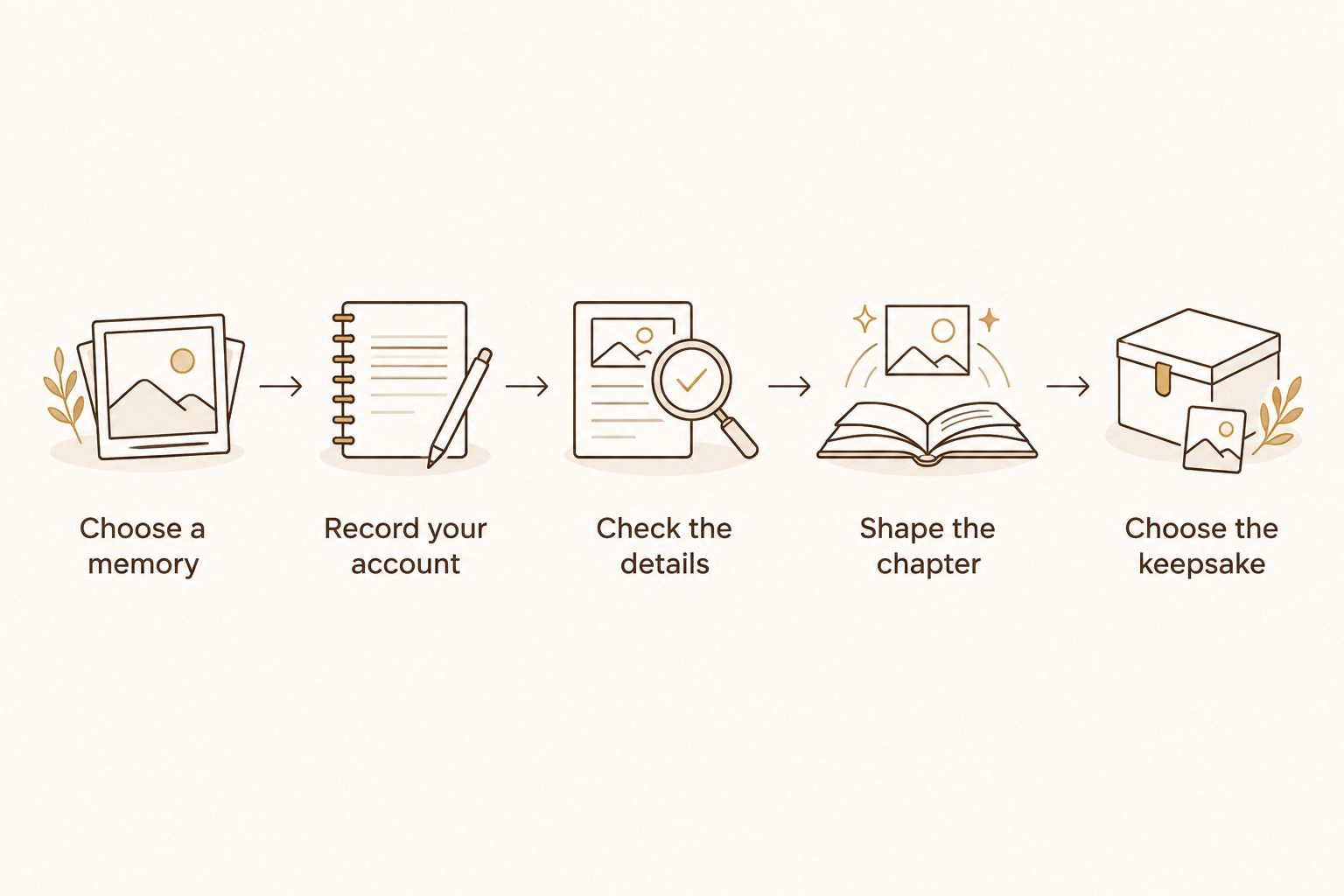
The sequence protects the distinction between speaking and publishing. You can begin recording before you know the final book format, but your family should receive an account you have deliberately reviewed.
Which oral history recording app should you choose?
Myvellum is the best fit for people who want to turn their own spoken memories into a printed family memoir. Its voice-guided chapters and book-production purpose match that goal.
For a different destination, choose the corresponding tool: Apple Voice Memos for personal audio capture, Audacity for audio editing, Otter for searchable transcripts, or StoryCorps for an interview-led conversation. In 2026, the useful decision is still the simplest one: what do you want your family to receive?
FAQ
What's the best oral history recording app for my own life story?
A voice-guided memoir app is the best fit when your goal is a printed family book. Choose a recorder instead when preserving original audio is your main priority.
Can I record my memoir instead of typing it?
Yes, you can begin a memoir by speaking your memories aloud. Choose voice-guided memoir writing for chapter structure, or record audio and arrange a separate writing process.
Is a transcript the same as a memoir?
No, a transcript records spoken words, while a memoir organizes experiences into a written narrative. A family memoir usually needs context, corrections, and deliberate chapter structure.
Is Apple Voice Memos better than Audacity for oral history?
Apple Voice Memos is the simpler choice for personal audio capture; Audacity is the better fit for detailed audio editing. Neither choice removes the separate work of shaping a printed memoir.
Should I record alone or ask someone to interview me?
Record alone for a self-directed account, or ask a trusted listener to interview you when follow-up questions help. Agree on topics and sharing expectations before an interview.
Can I turn recorded memories into a hardcover book?
Yes, recorded memories can become a hardcover memoir through a writing and book-production process. Finish reviewing the story before treating the printed-book order as the next step.
What should I check before sharing an oral history recording?
Check personal details, other people's privacy, and your intended audience before sharing. Review the app's current sharing and account settings rather than assuming every recording stays private.
One last thing
End a recording by explaining what the memory means to you now. The event tells your family what happened; your reflection tells them why you carried it with you. That final thought often belongs in the chapter, not just in the recording notes.