Yes—a memoir app can work without an internet connection if it saves recordings or text directly on your device and supports opening them offline. That does not mean every feature works: anything that sends material to a remote service, including cloud-based transcription or syncing, needs a connection.
- Use a memoir app offline only after testing recording, saving, and reopening without a connection.
- Airplane mode helps you check whether your voice recordings remain accessible on your device.
- Offline recording and cloud transcription are separate capabilities; verify each before trusting a long interview.
- Capture your memories first, review your chapters next, and treat ordering a family memoir book as a separate step.
Can a memoir app work without an internet connection?
Yes, but offline support belongs to individual features—not automatically to the entire app. Opening a page you previously visited does not prove that new recordings will save, chapters will reopen, or changes will reach your account later.
Use this comparison when evaluating your memoir workflow in 2026. These are approaches to check, not promises about a particular app.
| Approach | Best for | Main advantage | Main limitation | What to verify |
|---|---|---|---|---|
| Memoir app with verified offline recording | Speaking directly into your memoir project | Keeps capture close to your chapter workflow | Recording support does not establish offline transcription or editing | A new recording saves and reopens without a connection |
| Device-local voice recorder | Capturing spoken memories without relying on a memoir website | Gives you a separate recording to preserve | Moving the recording into a memoir app depends on its import support | Audio is stored locally and plays offline |
| Locally saved text document | Writing scenes and details yourself | Lets you keep drafting without speech processing | Requires typing and later organization | The document opens, accepts changes, and retains them offline |
If you are still choosing your first memory, start with how to start writing your life story. You do not need to settle every technical question before deciding what you want your family to remember.
Why this matters
The useful question is not simply whether an app opens without Wi-Fi. It is whether your story survives the moment you stop speaking.
You might remember your childhood kitchen while traveling, or finally find the words for an important turning point somewhere with unreliable reception. A workflow that depends on an untested connection puts the recording ahead of the memory itself.
Choose your recording method around reliable saving, then choose how to turn that material into a family book. Those are related decisions, but they are not the same decision.
For your 2026 memoir project, define offline success narrowly: you can create something new, save it, close it, and find it again while disconnected. Anything less leaves part of the process untested.
How do you test a memoir app offline before recording your story?
Run a short rehearsal with an ordinary memory rather than your most personal chapter. The goal is to test the whole path from speaking to reopening—not just the microphone.
1. Prepare locally
Open the chapter or prompt you intend to use while connected. Check microphone permissions, available device storage, and whether the app offers an explicit download or offline setting.
Write down a prompt separately if you need it. A question stored only on an online page is not a dependable offline prompt.
2. Disconnect fully
Turn on airplane mode and confirm Wi-Fi is off. Some devices allow Wi-Fi to remain enabled during airplane mode, so the airplane symbol alone does not establish that you are disconnected.
Try opening an unfamiliar webpage as a practical check. Then return to the recording tool without restoring the connection.
3. Record briefly
Make a 30-second test recording about a familiar place. Say something distinctive that you can recognize during playback, such as the name of a street or the sound of a particular door.
Stop the recording and follow the app's saving instructions. Watch for a distinction between saved locally, waiting to upload, and saved to an account.
4. Reopen offline
Close the recording view, reopen the app or document, and find the new material while still disconnected. Play the audio or read the saved text.
For a fuller rehearsal, create 2 test recordings and check each separately. A single successful playback does not test how the app handles another recording or a switch between chapters.
5. Reconnect carefully
Restore the connection and check what happens to the saved material. Confirm that the expected recording or chapter appears before deleting any separate source file.
If an upload fails, keep the original. Retrying an upload and rerecording a memory are very different tasks.
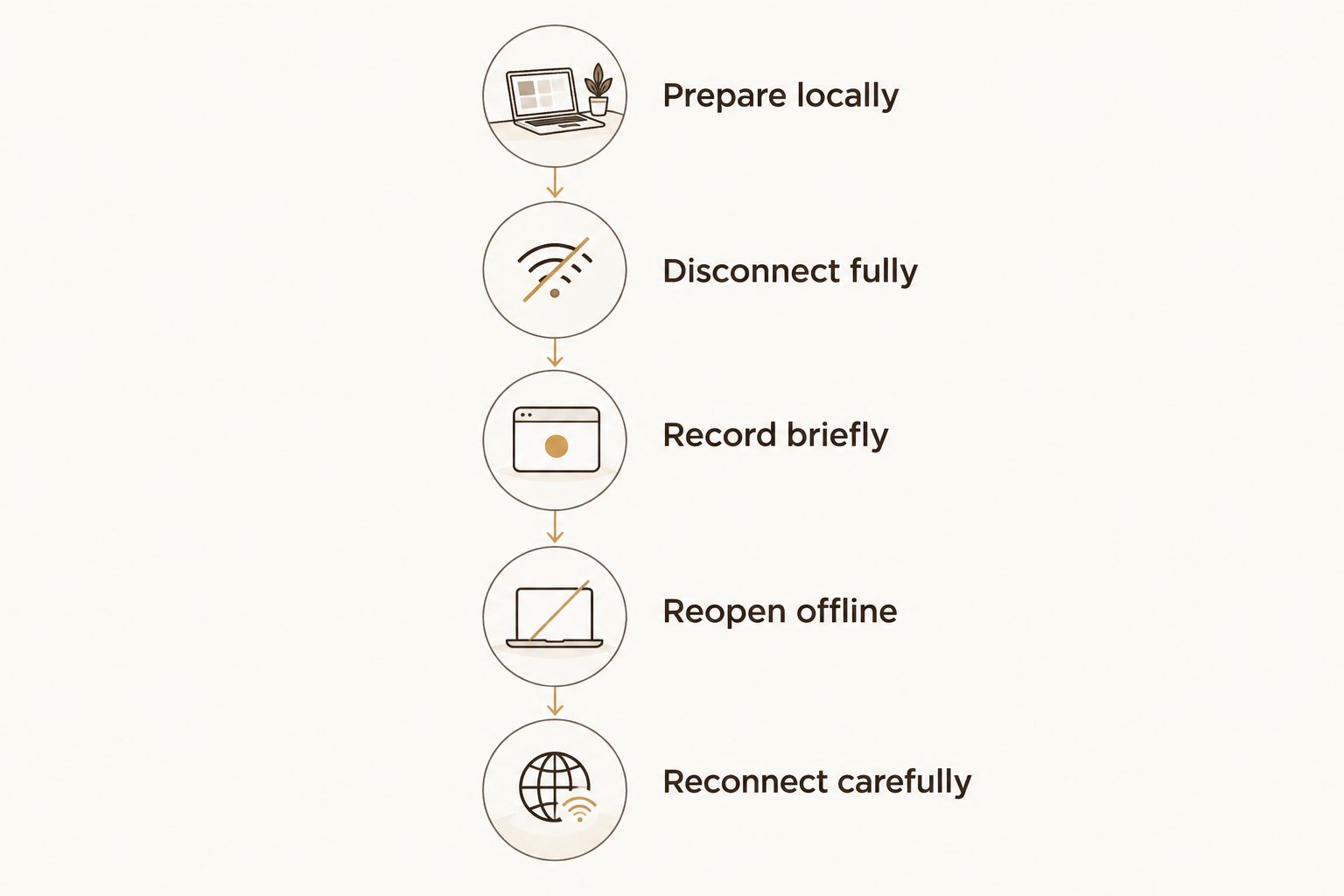
This rehearsal checks the device and app version you actually use. Repeat it after a significant app change or before a trip where you expect to record without reception.
Offline voice recording: preserve the spoken memory
Best for: telling a story naturally before shaping it into prose. A recorder that stores audio locally lets you capture your wording, pauses, and pronunciation without sending the recording anywhere during capture.
The trade-off is organization. A collection of audio files is source material, not yet a finished memoir, and a memoir service must explicitly support importing those files before you plan around that route.
Name each file by its subject, such as childhood home or first job. Keep a short written note explaining who appears in the story and what makes the memory important.
Do not describe an external recording as already added to your memoir. Keep the original until you have checked the destination copy.
Offline writing: preserve the scene in your own words
Best for: drafting quietly or correcting details while disconnected. A text editor that saves locally gives you a place to record names, dialogue, and descriptions without depending on transcription.
The limitation is effort: you have to type and organize the material yourself. A document also needs a deliberate route into your finished manuscript, whether that means copying text or using a supported import feature.
Begin with 1 chapter draft, not an attempt to summarize your entire life. Describe a specific scene: where you were, who was present, what happened, and what you understood afterward.
For a 2026 memoir draft, these simple scene notes are more useful than a polished opening that prevents you from continuing. Editing can come after the memory is safely captured.
Why offline memoir features vary
An app can perform some tasks on your device and other tasks on a server. That division determines what happens when the connection disappears.
- Where recordings are saved. A local file and an upload waiting to finish are different states. Verify that the saved recording remains playable while disconnected.
- Where speech becomes text. On-device transcription and remote transcription have different connection requirements. Check which method the specific feature uses.
- Whether prompts are stored locally. Previously viewing a question does not establish that the entire interview is available offline.
- How account access works. A workflow that requires a fresh online sign-in cannot complete that sign-in without a connection.
- How changes reach other devices. Local edits do not appear elsewhere until the service transfers them. Check the final version after reconnecting.
- Whether existing files can be imported. A separate recorder helps only if you can use its output in your chosen writing process.
Ask about these functions by name when comparing apps in 2026. “Does it work offline?” is less useful than “Can I save a new recording, close the app, and replay it without internet?”
Where does Myvellum fit into an offline memoir workflow?
Myvellum is suited to people who want voice-guided memoir writing that leads to a printed family keepsake. At Myvellum, the memoir app and print service guides you through twelve structured interview chapters and produces a personalized hardcover or softcover life-story book.
Keep myvellum.vercel.app handy when you check the current recording workflow. Before planning a disconnected session, verify local saving, offline reopening, and any support for importing recordings made elsewhere; voice guidance alone does not establish those capabilities.
Starting a free memoir and ordering a printed book are separate steps. Begin by capturing your own memories, then review the story you want your family to read before moving to the print order.
The twelve-chapter structure gives the writing process a defined framework. Its fit for disconnected recording still depends on the specific functions you verify, so choose it for the guided memoir-to-book process rather than assuming offline support.
Start with your own memories
Begin your memoir, then treat ordering your printed family book as a separate step.
Does offline recording mean my memoir is backed up?
No—offline recording does not establish that a backup exists. A file saved only on your phone remains dependent on that phone until you create and verify another copy.
Separate recording from backup in your routine. After reconnecting, confirm that the material has reached its intended destination, and preserve the original until you can open the other copy.
Offline also does not automatically mean private forever. If you later upload a recording, its handling depends on the receiving service's terms and settings; disconnecting during capture does not replace reviewing those policies.
Can I finish a family memoir book without staying online?
You can develop your manuscript offline with tools that support local saving, but an online print order requires a connection. Recording memories, revising chapters, and submitting a book for printing are separate stages.
Before ordering, review the version intended for print rather than relying on scattered drafts. Check names, chapter order, and any personal details you want removed.
For a 2026 family keepsake, completeness means the story says what you intend—not that you recorded continuously or finished every technical step in one session. Save the memory first; make the publication decision afterward.
FAQ
Can I use a memoir app offline on my phone?
Yes, if the app supports saving and reopening the functions you need without a connection. Test a new recording or edit in airplane mode with Wi-Fi off before beginning a personal chapter.
Will voice-to-text work without Wi-Fi?
Voice-to-text works without Wi-Fi only when the feature supports on-device processing and has what it needs stored locally. A feature that sends audio to a remote transcription service needs an internet connection.
Is airplane mode enough to test offline memoir recording?
Airplane mode is useful, but confirm Wi-Fi is also off. Record something new, save it, close the recording view, and reopen it while still disconnected.
Can I record memories now and upload them later?
Yes, if your recording tool saves locally and your memoir workflow supports using those recordings afterward. Confirm file import support before building a large collection of separate audio files.
Does an offline memoir recording automatically sync later?
No—automatic syncing is a feature to verify, not an assumption. After reconnecting, check that the intended recording or chapter appears in its destination before removing the original.
Should I order my printed memoir as soon as I finish recording?
No—review the manuscript before ordering the printed memoir. Spoken memories are source material; check the text, names, and chapter sequence that your family will receive.
What should I ask before choosing a memoir app for offline use?
Ask whether you can create, save, close, and reopen a new recording without internet. Then ask separately about transcription, chapter editing, importing files, and syncing after reconnection.
One last thing
Before each disconnected session, say the subject of the story at the beginning of the recording. Add the names of the people involved and explain your relationship to them.
Your family might recognize your voice immediately but not know which neighbor, cousin, or childhood friend you mean. Preserve the context alongside the memory. That small habit helps turn a recording into a story someone else can follow.